Blog

  • Disable WordPress New User Email Notification

    When a new user creates an account on a wordpress.org blog, the administrator is sent a notification email. Websites that have a large number of signups each day can generate a lot of emails announcing each new user.

    I wrote a simple WordPress plugin to disable the new user notification email. Visit this plugin’s page in the official WP Plugins Directory.

    Installation instructions

    1. Download disable-wp-new-user-notification.zip
    2. Decompress the file contents
    3. Upload the disable-wp-new-user-notification folder to a WordPress plugins directory (/wp-content/plugins)
    4. Activate the plugin from the Administration Dashboard
  • WordPress Sidebar Stats Widget

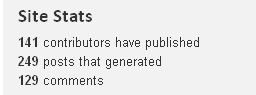
    I wrote a WordPress plugin that displays a small collection of site stats in a sidebar widget. Here is a screen shot of sample output:

    sidebar-stats-widget

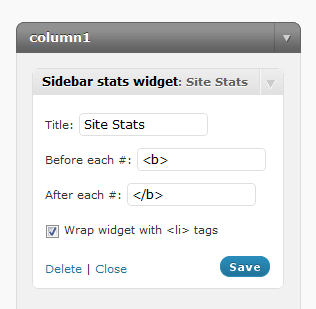
    Widget options screen shot

    The widget includes a control panel to change the title and format the HTML that is inserted before and after each numerical stat.

    sidebar-stats-widget-options

    Installation Instructions

    1. Download sidebar-stats-widget.zip
    2. Decompress the file contents
    3. Upload the sidebar-stats-widget folder to a WordPress plugins directory (/wp-content/plugins)
    4. Activate the plugin from the Administration Dashboard
    5. Open the Widgets page under the Appearance section
    6. Drag the Sidebar Stats Widget to the active sidebar
    7. Configure the widget options to suit your needs and click Save

    WordPress.org plugin page

    This plugin is in the official WordPress Plugin Directory here.