Blog

  • Landing page triggers WP plugin free version

    This plugin redirects users of your WordPress website to any page you like after they publish a new post or log out. You can provide any URL, so the page can even be on a different website altogether.

    Landing pages can help coordinate, congratulate or incentivize users who are already interacting with your website.

    I have also written a non-free version that includes redirects after leaving a comment and user login in addition to the free features.

    Installation Instructions

    1. Download landing-page-triggers-free.zip
    2. Decompress the file contents
    3. Upload the landing-page-triggers-free folder to a WordPress plugins directory (/wp-content/plugins)
    4. Activate the plugin from the Administration Dashboard
    5. Visit “Landing pages” under Settings to configure the triggers


    Control panel screen shot:
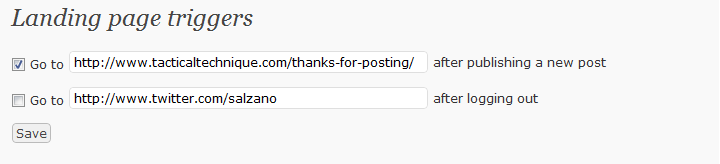
    landing-page-triggers-free-version


    I have been using this functionality to thank contributors for their posts, and it works wonderfully. If you are interested in the enhanced feature set, that version is available here for 6$ USD.
  • WP Plugin: Recent comments widget with excerpts

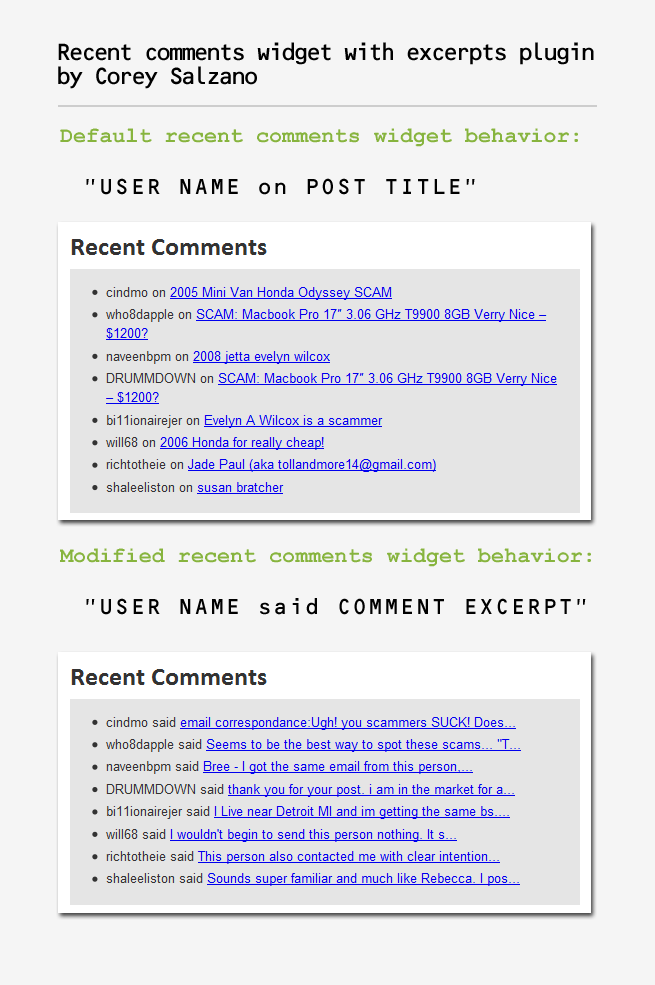
    I wrote a WordPress plugin to modify the behavior of the recent comments widget. Since WP version 2.8.0, popular widgets have been included as core functionality. I don’t like how the recent comments widget works, so I changed it. Instead of displaying the post titles that received comments, my plugin shows comment excerpts. I made this graphic to show the difference between the default behavior and the effect of this plugin:

    recent-comments-widget-with-excerpts

    WordPress.org link

    Visit this plugin’s page in the official WP plugin directory.


    Installation Instructions

    1. Download recent-comments-widget-with-excerpts.zip
    2. Decompress the file contents
    3. Upload the recent-comments-widget-with-excerpts folder to a WordPress plugins directory (/wp-content/plugins)
    4. Activate the plugin from the Administration Dashboard
    5. Open the Widgets page under the Appearance section
    6. Drag the Recent Comments widget to the active sidebar

    Enjoy!