Check the status of CREATE DATABASE and ALTER DATABASE queries
SELECT * FROM sys.dm_database_copiesList all users and roles
SELECT * FROM sys.database_principalsCREATE DATABASE and ALTER DATABASE queriesSELECT * FROM sys.dm_database_copiesSELECT * FROM sys.database_principalsphpInfo() outputRun <?php phpInfo(); in a browser and look for “with Xdebug” like is shown near the bottom left of this screenshot:
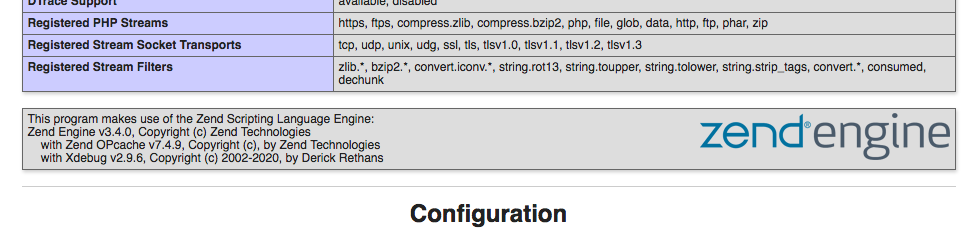
There’s also a large section of xDebug settings near the bottom of the page. Here’s mine:
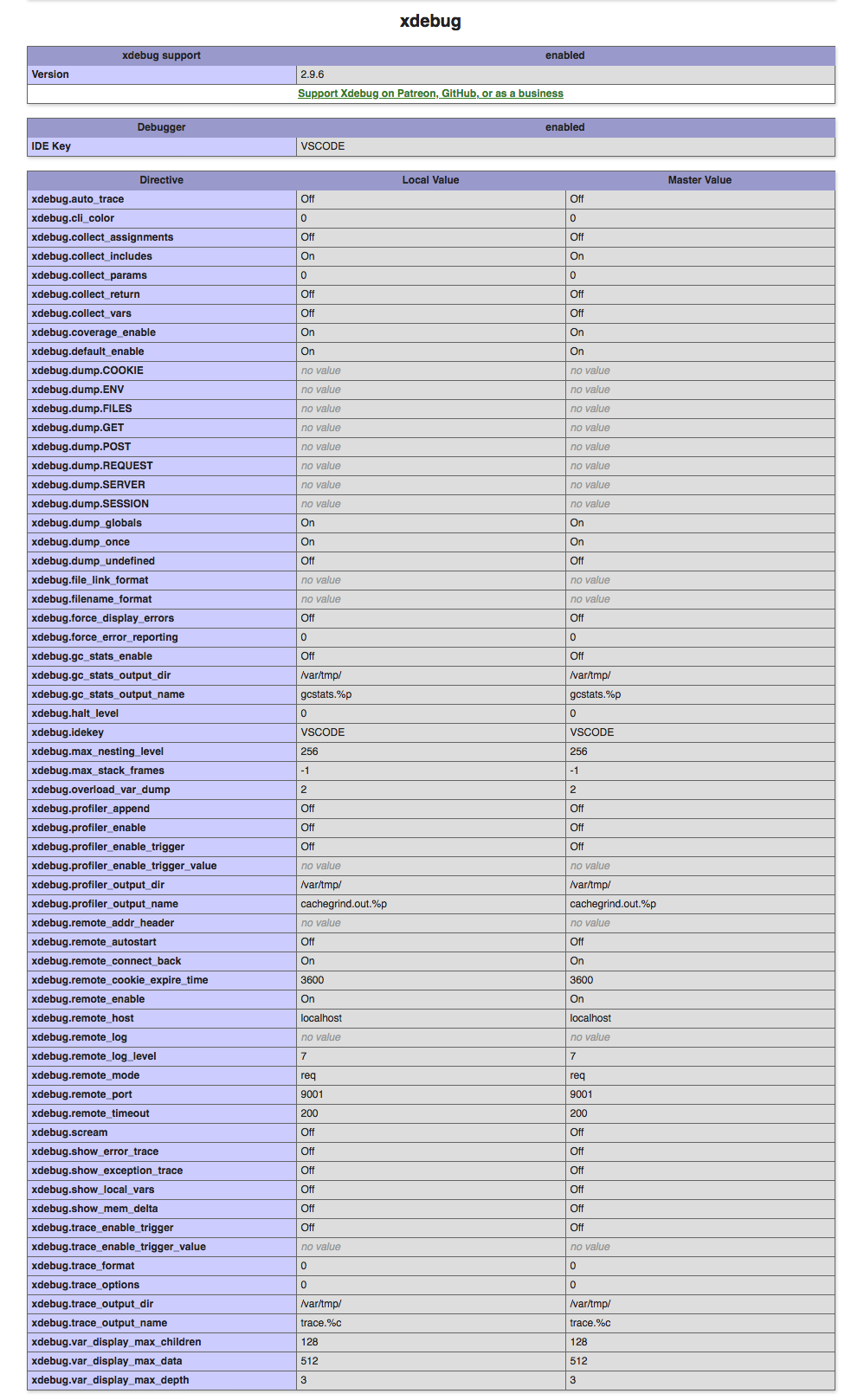
If you do not see xDebug in these locations of your phpInfo() output, xDebug is not installed or configured correctly.
phpInfo() output into http://xdebug.org/wizardI used the wizard at xdebug.org to install xDebug even though the command php --version told me it was already installed.
composer global update
valet install
valet restartI had to restart before xDebug would show up in my phpInfo() output.
[xdebug]
zend_extension=/usr/local/lib/php/pecl/20190902/xdebug.so
xdebug.idekey=VSCODE
xdebug.default_enable=1
xdebug.remote_enable=1
;xdebug.remote_log=/Users/Corey/Sites/xdebug.log
;xdebug.remote_log_level=10
xdebug.remote_port=9001
xdebug.remote_connect_back=1In November of 2021, I updated my local versions of PHP and xDebug. PHP 8.0.12 and xDebug 3.1.1 need an ext-xdebug.ini file that looks like this:
[xdebug]
zend_extension=/usr/local/lib/php/pecl/20200930/xdebug.so
xdebug.idekey=VSCODE
xdebug.client_port=9001
xdebug.mode=debug
xdebug.start_with_request=yes/usr/local/etc/php/7.4/conf.d/ext-xdebug.iniUse the command valet restart every time you change PHP ini files like php.ini or ext-xdebug.ini.
If you configure xDebug with xdebug.remote_autostart=1, it will debug everything all the time.
Anytime xDebug examines PHP files, it will create log entries if its configuration specifies a log file location. I found that log entries were created when Valet was starting up but not when pages were loaded in the browser.
The remote_log and remote_log_level settings are commented-out with semicolons because my configuration is now working. A log level value of 10 will grow the log file to hundreds of megabytes in just a few hours of loading pages.
Do not try to prettify the ext-xdebug.ini file by putting spaces around the equals signs. My breakthrough to a working debugger occurred shortly after I removed spaces from ext-xdebug.ini, updated Valet, and restarted my computer.
{
	"folders": [
		{
			"path": "."
		}
	],
	"settings": {},
	"launch": {
		// Use IntelliSense to learn about possible attributes.
		// Hover to view descriptions of existing attributes.
		// For more information, visit: https://go.microsoft.com/fwlink/?linkid=830387
		"version": "0.2.0",
		"configurations": [
			{
				"name": "Listen for XDebug",
				"type": "php",
				"request": "launch",
				"port": 9001
			},
			{
				"name": "Launch currently open script",
				"type": "php",
				"request": "launch",
				"program": "${file}",
				"stopOnEntry": true,
				"cwd": "${fileDirname}",
				"port": 9001,
				"runtimeExecutable": "/usr/local/Cellar/php/7.4.9/bin/php",
				"pathMappings": {
					"/Users/Corey/Sites/sitename": "${workspaceFolder}"
				}
			}
		]
	}
}
The runtimeExecutable value points to the PHP executable installed by homebrew. The pathMappings value points to the place where this website lives on my computer.
Stop and restart the debugger in VS Code everytime you change the workspace file or the web server is restarted.
I got a new Macbook, and restored my old Intel processor back up to it. That means there are two versions of homebrew on my computer now, and I got into a situation where phpInfo() calls on web pages returned a different version of PHP than php -v in terminal. This fixed that, but I do not know why:
rm ~/.config/valet/valet.sock
valet restart