Category: Web development

  • Configure InvoiceShelf to use MailHog

    I enjoy InvoiceShelf since I migrated to it in December 2024. InvoiceShelf is open-source invoicing software. I do not allow it to send emails, but I’m exploring the idea.

    How to prevent local web apps from sending emails

    I run MailHog. It’s an open-source email catcher that allows me to see what emails sites running on my computer have tried to send.

    Configure InvoiceShelf to use MailHog

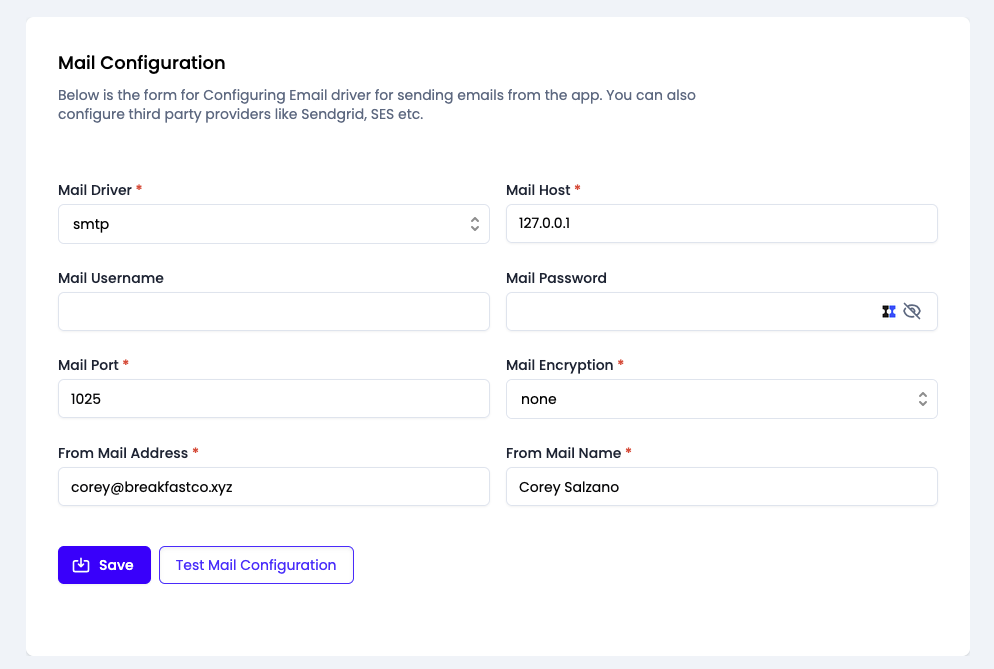
    Go to Settings > Mail Configuration.

    • Mail Driver: smtp
    • Mail Host: 127.0.0.1
    • Mail Port: 1025
    • Mail Encryption: none

    Screenshot

    Here’s a screenshot of my Mail Configuration page.

    Screenshot that shows the Mail Configuration page inside InvoiceShelf.

  • Set up Drupal on Laravel Valet

    1. Create a directory for the site & install Drupal files

      All my sites live in ~/sites, so I navigated there in macOS Terminal and ran these commands. I want my Drupal site in a folder named p8hd and my local website to live at https://p8hd.test.

      composer create-project drupal/recommended-project:10.4.1 p8hdcd p8hd
      valet link
      valet secure
      

      This creates a directory at “~/sites/p8hd”, populates it with composer.json and composer.lock files, installs the composer dependencies, creates a symbolic link, and creates a TLS certificate. A website is now live at the URL https://p8hd.test.

      I chose 10.4.1 because I am running PHP 8.2.26 and that’s the latest compatible version of Drupal.

    2. Create a database

      I copied these commands from the Drupal installation guide.

      mysql -u root -p -e "CREATE DATABASE p8hd CHARACTER SET utf8mb4 COLLATE utf8mb4_unicode_ci";
      mysql -u root -p

      Enter the database password twice, and paste this query at the mysql prompt:

      GRANT SELECT, INSERT, UPDATE, DELETE, CREATE, DROP, INDEX, ALTER, CREATE TEMPORARY TABLES ON p8hd.* TO 'root'@'localhost';
    3. Visit the site and run the installer

      https://p8hd.test redirects to https://p8hd.test/core/install.php and that’s a good thing.

    Screenshot

    Here is a screenshot of https://p8hd.test after running the installer:

    p8h Welcome! You haven't created any frontpage content yet. Congratulations and welcome to the Drupal community.
  • Laravel Valet PHP.ini Path

    The path to the php.ini file my Laravel Valet uses is /opt/homebrew/etc/php/8.1/php.ini

    In order to see changes in phpInfo() calls, the valet restart command is not good enough. I must use the command brew services restart [email protected]

  • Microsoft Azure SqlServer

    Check the status of CREATE DATABASE and ALTER DATABASE queries

    SELECT * FROM sys.dm_database_copies

    List all users and roles

    SELECT * FROM sys.database_principals
  • Troubleshooting VS Code, xDebug, and Laravel Valet on macOS

    Problem: xDebug is not showing up in phpInfo() output

    Run <?php phpInfo(); in a browser and look for “with Xdebug” like is shown near the bottom left of this screenshot:

    There’s also a large section of xDebug settings near the bottom of the page. Here’s mine:

    If you do not see xDebug in these locations of your phpInfo() output, xDebug is not installed or configured correctly.

    Solutions

    Paste phpInfo() output into http://xdebug.org/wizard

    I used the wizard at xdebug.org to install xDebug even though the command php --version told me it was already installed.

    Update Valet

    composer global update
    valet install
    valet restart

    Restart your computer

    I had to restart before xDebug would show up in my phpInfo() output.

    Problem: xDebug is working, but not responding to browser page loads

    Solutions

    Verify contents of ext-xdebug.ini

    xDebug 2.x

    [xdebug]
    zend_extension=/usr/local/lib/php/pecl/20190902/xdebug.so
    xdebug.idekey=VSCODE
    xdebug.default_enable=1
    xdebug.remote_enable=1
    ;xdebug.remote_log=/Users/Corey/Sites/xdebug.log
    ;xdebug.remote_log_level=10
    xdebug.remote_port=9001
    xdebug.remote_connect_back=1

    xDebug 3.x

    In November of 2021, I updated my local versions of PHP and xDebug. PHP 8.0.12 and xDebug 3.1.1 need an ext-xdebug.ini file that looks like this:

    [xdebug]
    zend_extension=/usr/local/lib/php/pecl/20200930/xdebug.so
    xdebug.idekey=VSCODE
    xdebug.client_port=9001
    xdebug.mode=debug
    xdebug.start_with_request=yes

    Location of ext-xdebug.ini

    /usr/local/etc/php/7.4/conf.d/ext-xdebug.ini

    Use the command valet restart every time you change PHP ini files like php.ini or ext-xdebug.ini.

    If you configure xDebug with xdebug.remote_autostart=1, it will debug everything all the time.

    Anytime xDebug examines PHP files, it will create log entries if its configuration specifies a log file location. I found that log entries were created when Valet was starting up but not when pages were loaded in the browser.

    The remote_log and remote_log_level settings are commented-out with semicolons because my configuration is now working. A log level value of 10 will grow the log file to hundreds of megabytes in just a few hours of loading pages.

    Do not try to prettify the ext-xdebug.ini file by putting spaces around the equals signs. My breakthrough to a working debugger occurred shortly after I removed spaces from ext-xdebug.ini, updated Valet, and restarted my computer.

    Contents of VS .code-workspace file

    {
    	"folders": [
    		{
    			"path": "."
    		}
    	],
    	"settings": {},
    	"launch": {
    		// Use IntelliSense to learn about possible attributes.
    		// Hover to view descriptions of existing attributes.
    		// For more information, visit: https://go.microsoft.com/fwlink/?linkid=830387
    		"version": "0.2.0",
    		"configurations": [
    			{
    				"name": "Listen for XDebug",
    				"type": "php",
    				"request": "launch",
    				"port": 9001
    			},
    			{
    				"name": "Launch currently open script",
    				"type": "php",
    				"request": "launch",
    				"program": "${file}",
    				"stopOnEntry": true,
    				"cwd": "${fileDirname}",
    				"port": 9001,
    				"runtimeExecutable": "/usr/local/Cellar/php/7.4.9/bin/php",
    				"pathMappings": {
    					"/Users/Corey/Sites/sitename": "${workspaceFolder}"
    				}
    			}
    		]
    	}
    }

    The runtimeExecutable value points to the PHP executable installed by homebrew. The pathMappings value points to the place where this website lives on my computer.

    Stop and restart the debugger in VS Code everytime you change the workspace file or the web server is restarted.

    M1 Processor

    I got a new Macbook, and restored my old Intel processor back up to it. That means there are two versions of homebrew on my computer now, and I got into a situation where phpInfo() calls on web pages returned a different version of PHP than php -v in terminal. This fixed that, but I do not know why:

    rm ~/.config/valet/valet.sock
    valet restart 
  • Solving a Confusing MigrationBlocker While Moving to Azure SQL Database

    This week, I’m altering functions and stored procedures in a SQL Server 2008 database so that it can be migrated to Azure. The Data Migration Assistant does a great job of generating reports identifying MigrationBlockers, but one type of error was vague enough to confuse me for a few minutes. Here’s an example of that error:

        {
          "Recommendations": [
            {
              "ApplicableCompatibilityLevels": [
                "CompatLevel100",
                "CompatLevel110",
                "CompatLevel120",
                "CompatLevel130",
                "CompatLevel140"
              ],
              "ChangeCategory": "MigrationBlocker",
              "RuleId": "46010",
              "Title": "One or more objects contain statements that are not supported in Azure SQL Database [46010]",
              "Impact": "While assessing the schema on the source database, one or more syntax issues were found. Syntax issues on the source database indicate that some objects contain syntax that is unsupported in Azure SQL Database.",
              "ImpactDetail": "Function: [dbo].[GalleryXML] contains a statement that is not supported on Microsoft Azure SQL Database v12. The specific error is: Incorrect syntax near AS.",
              "Recommendation": "Note that some of these syntax issues may be reported in more detail as separate issues in this assessment.  Review the list of objects and issues reported, fix the syntax errors, and re-run assessment before migrating this database.",
              "MoreInfo": ""
            }
          ],
          "IsSelectedForMigration": true,
          "Eligibility": {
            "IsEligibleForMigration": true,
            "Explanation": "OK"
          },
          "ObjectName": "GalleryXML",
          "SchemaName": "dbo",
          "ObjectType": "UserDefinedFunction"
        },

    The error text, “Incorrect syntax near AS,” was just not a strong clue as to what was wrong with this function. The purpose of the function is to create structured XML that can be de-serialized into an instance of an object in C#. I use PATH Mode to accomplish this, and it is one of my favorite maneuvers when operating in SQL Server/.Net. Here is an abbreviated version of the query to help you understand the required changes to continue using this method in an Azure database:

    SELECT 
    ID,
    
    ...
    
    --Subquery for photos
    (
    	SELECT 
    	ID,
    
    	...
    
    	FROM GalleryPhotosTbl 
    	WHERE GalleryID = GalleryTbl.ID
    	FOR XML PATH('GalleryPhoto'), TYPE
    ) AS Photos
    FROM GalleryTbl
    WHERE GalleryTbl.ID = @ID
    FOR XML PATH('Gallery'), TYPE

    The syntax that Azure doesn’t support is “AS Photos.” Here is the solution:

    SELECT 
    ID,
    
    ...
    
    --Subquery for photos
    (
    	SELECT 
    	ID,
    
    	...
    
    	FROM GalleryPhotosTbl 
    	WHERE GalleryID = GalleryTbl.ID
    	FOR XML PATH('GalleryPhoto'), root ('Photos'), TYPE
    )
    FROM GalleryTbl
    WHERE GalleryTbl.ID = @ID
    FOR XML PATH('Gallery'), TYPE

  • Detecting mixed case strings in ASP Classic

    I needed to detect a mixed case string in classic ASP. I define a mixed case string as containing both upper and lower case characters, like AuxagGsrLpa. I could not find a free function on the web to make this decision, so I wrote one.

    <%
    	Function isMixedCase( str )
    		'detects mixed case strings using the english alphabet
    		'ignores spaces and other non-alphabetic characters
    		str = trim( str )
    		isMixed = false
    		lastCase = ""
    		for i=1 to len( str )
    			currentChar = mid( str, i, 1 )
    			if asc( currentChar ) >= 65 and asc( currentChar ) <= 90 then
    				if lastCase <> "" and lastCase <> "upper" then
    					isMixed = true
    					exit for
    				else
    					lastCase = "upper"
    				end if
    			else
    				if asc( currentChar ) >= 97 and asc( currentChar ) <= 122 then
    					'lower
    					if lastCase <> "" and lastCase <> "lower" then
    						isMixed = true
    						exit for
    					else
    						lastCase = "lower"
    					end if
    				else
    					lastCase = ""
    				end if
    			end if
    		next
    		if isMixed then
    			isMixedCase = true
    		else
    			isMixedCase = false
    		end if
    	End Function
    %>

    Here are a few test strings to demonstrate the functionality:


    <% response.write "Hello " & isMixedCase( "Hello " ) & " <br>" response.write "hello! " & isMixedCase( "hello!" ) & " <br>" response.write "HELLO " & isMixedCase( "HELLO " ) & " <br>" response.write "hello there " & isMixedCase( "hello there" ) & " <br>" response.write "hellothere " & isMixedCase( "hellothere" ) & " <br>" response.write "hellotherE " & isMixedCase( "hellotherE" ) & " <br>" %>

    Here is the resulting HTML output of the tests:

    Hello True
    hello! False
    HELLO False
    hello there False
    hellothere False
    hellotherE True

  • Matching MD5 hashes in ASP.NET and ASP Classic

    The goal of this page is to put two MD5 code samples on the same web page, one for ASP classic and one for ASP.NET. String formatting (like ASCII vs UTF-8) can trip up coding these two routines. These two code samples will produce the same MD5 hash output.

    Classic ASP/VBScript MD5

    The ASP code is simple once you have a copy of md5.asp from http://frez.co.uk. The only file in the ZIP that you need is md5.asp.


    <!--#include file="md5.asp"-->
    <% response.write md5("[email protected]") %>

    ASP.NET MD5

    The keys to getting the .net output to match are encoding.ascii and toString("x2").

    <%@ Import Namespace="System.Security.Cryptography" %>   
    <script language="VB" runat="server">
    
    	Public Sub Page_Load( sender As Object, e As EventArgs )
    
    		Dim strPlainText as String = "[email protected]"
      		
    		dim md5Hasher as MD5 = MD5.create( )
    		
    		dim result as byte( ) = md5Hasher.computeHash( encoding.ascii.getBytes( strPlainText))
    		
    		for each singleByte as byte in result
    			response.write ( singleByte.ToString("x2") )
    		next
    		
    	End Sub
    
    </script>
    

  • “Time ago” formatting in ASP classic

    Today, I needed to convert a time stamp like “1/25/2011 10:42:11 AM” to a readable sentence format like “2 months and 6 hours ago.” Here’s the code I came up with:

    
    	function timeAgo( byval time )
    		sentence = ""
    		hits = 0
    		piecesAgo = array( 0, 0, 0, 0, 0, 0 )
    		piecesTotals = array( 0, 12, 30, 24, 60, 60 )
    		labels = array( "year", "month", "day", "hour", "minute", "second" )
    		dateAddSymbols = array( "yyyy", "m", "d", "h", "n", "s" )
    
    		for p=0 to uBound( piecesAgo )
    			piecesAgo( p ) = 0 + datediff( dateAddSymbols( p ), time, now( ))
    
    			if piecesAgo( p ) <> 0 then
    				time = dateAdd( dateAddSymbols( p ), piecesAgo( p ), time )
    			end if
    		next
    
    		'remove negative values
    		for p=uBound( piecesAgo ) to 0 step -1
    			if piecesAgo( p ) < 0 and p > 0 then
    				piecesAgo( p ) = piecesAgo( p ) + piecesTotals( p )
    				piecesAgo( p-1 ) = piecesAgo( p-1 ) - 1
    			end if
    		next
    
    		for p=0 to uBound( piecesAgo )
    			if piecesAgo( p ) <> 0 then
    
    				if len( sentence ) > 0 then
    					sentence = sentence & " and "
    				end if
    				sentence = sentence & piecesAgo( p ) & " " & labels( p )
    				if piecesAgo( p ) > 1 then
    					sentence = sentence & "s"
    				end if
    				hits = hits + 1
    				if hits >= 2 then
    					exit for
    				end if
    			end if
    		next
    
    		set piecesAgo = nothing
    		set piecesTotals = nothing
    		set labels = nothing
    		set dateAddSymbols = nothing
    
    		timeAgo = sentence & " ago"
    	end function
    
  • Clear default text from input boxes using Javascript

    Providing labels is a great way to help users interact with your website properly. I like to put instructional text inside text boxes to save space. Users get annoyed when the text inside the box they click on does not disappear when they are ready to type. Users do not want to backspace default instructional text before typing in boxes, so some code is required to make this happen.

    I would like to share two small Javascript functions. The first clears out default text box contents automatically when a user clicks on the box. The second restores the default instructional text if the user leaves the box empty.

    Implement these functions using onfocus=”wash(this);” and onblur=”checkWash(this);” on your text input control. You may want to avoid the second function on text fields where input is optional, so the user can leave the text box blank.

    function wash( anInput ){
    if(anInput.value == anInput.defaultValue) anInput.value = '';
    }

    function checkWash( anInput ){
    if(anInput.value == '') anInput.value = anInput.defaultValue;
    }

    Try it

    Look, I made a demo!


  • Classic ASP and Server.GetLastError in IIS7

    My classic ASP error logging scripts were dead in the water when I moved them to a Windows Server 2008 with IIS 7.0.

    Some code like this is useful to record errors in a database:

    dim objErrorInfo, errorStringStr
    set objErrorInfo = Server.GetLastError
    errorStringStr = objErrorInfo.File & ", line: " & objErrorInfo.Line & ", error: " & objErrorInfo.Number & " " & objErrorInfo.Description & ", " & objErrorInfo.ASPDescription & objErrorInfo.Category
    errorStringStr = replace( errorStringStr, "'", "''" )

    Instead of using the default 500 item in the list, create a new handler for status code 500.100. Point this at your script, and you should be all set to log errors.

    Another way is to enter the Error Pages module of the website profile, and click “Edit Feature Settings” on the right hand sidebar.

    This screen will appear:

    iis7getLastError

    Configure yours in a similar fashion, and Server.GetLastError will start working in your script.

  • Disguise Email Addresses for online publishing

    Disguise your email address or any text with this character obfuscation. This code &#99;&#111;&#114;&#101;&#121;&#64;&#101;&#120;&#97;&#109;&#112;&#108;&#101;&#46;&#99;&#111;&#109; will show up on a web page as [email protected]. You can share your email address without worrying that it will be collected by a spam bot.

    Enter some plain text


    Some losers send spam email for a living, and will send garbage to any email they can find online. Obfuscating email addresses in character codes cloaks them from some of the leeches. I decided to create code to automate this task.

    Here is an ASP classic function that will convert a string to ASCII characters. PHP code below. These characters will display as normal text to the casual user. The difference between alphabet characters and ASCII characters is that encoded characters must be evaluated before they look like an email address. This thin veil of secrecy is enough to fight off some email harvesters.

    
    public function asciiDisguise( string )
    	build = ""
    	for i=1 to len( "" & string )
    		build = build & "&#" & asc( mid( string, i, 1 )) & ";"
    	next
    	asciiDisguise = build
    end function

    Here is the same function in PHP.

    
    function asciiDisguise( $str ){
    	$build = "";
    	for( $i=0;$i<strlen( $str );$i++ ){
    		$build .= "&#" . ord( substr( $str, $i, 1 )) . ";";
    	}
    	return $build;
    }