Category: WordPress

  • When renaming your WP admin user, don’t neglect your comments

    A few months ago, popular people in the WordPress community (including Matt) made a push to stop using the user name “admin.” A considerably-sized brute force attack targeted this user name specifically since so many users never change or create an administrator with another name.

    I followed the wisdom of the crowd and this post I found that walks you through the process of creating a new user and deleting “admin” while moving all the posts in the process. It wasn’t until a few weeks later when I noticed a problem.

    I like to use themes that highlight my comments. This allows users to quickly find my updates about plugins and answers to questions that have been asked in a sea of one hundred comments. Well, all the comments I wrote while my user ID was 1 and my user name was admin were no longer highlighted.

    There is a user_id column in the wp_comments table that is not changed when you delete a user and move their posts to a new owner. You need to run a MySQL query like this to implement the fix:

    UPDATE wp_comments SET user_id = 11132 WHERE user_id = 1

    Before executing a query like this on a WP database, the new administrator’s user ID needs to be identified so you can change 11132, which is one of my user IDs. If you do not know how to find a user ID, search this page for “user id.”
  • Clobber spam users WordPress plugin

    I’ve built another plugin for WordPress websites with open registration. This plugin makes it easy to prevent spam accounts from publishing posts.

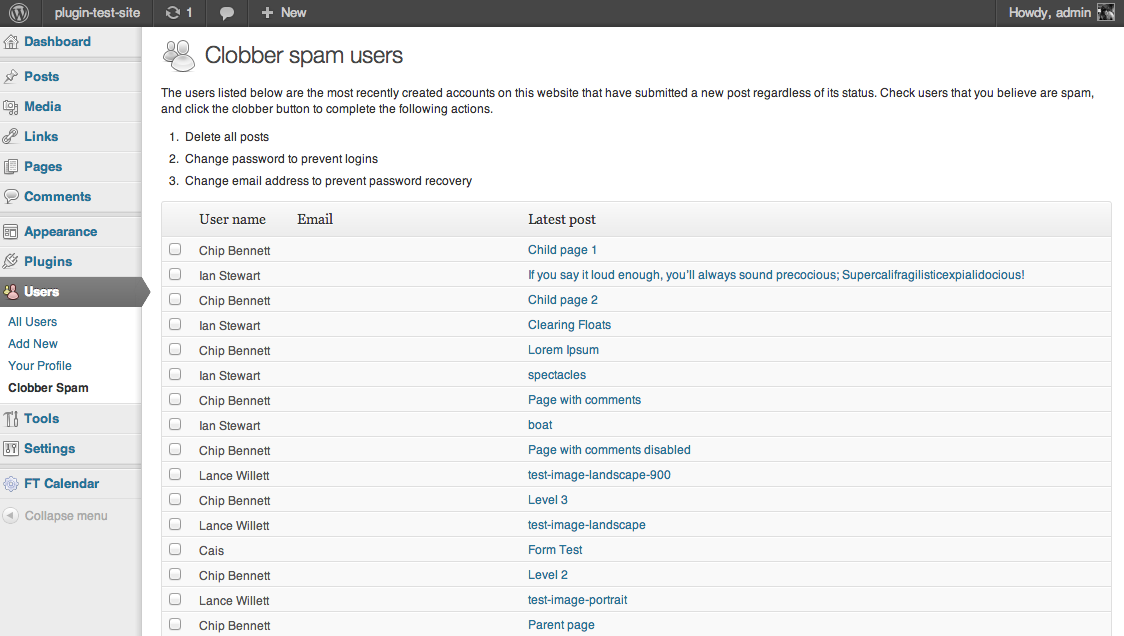
    A screen shot of the dashboard this plugin creates

    Frequently asked questions

    What does this thing do?
    This plugin adds an item to the Users menu of your administration dashboard. Click the “Clobber Spam” link and you will see a page that puts the most recently created user names next to the email address and the title of the most recently created post by that user. You can check a box next to the users that have submitted spam and click a button to delete all their posts and prevent them from logging in again.
    Why not just delete the users?
    Because the software these spammers use will try to submit more than one post for each account, sometimes days later. If you delete the user, the same user name can be recreated. We can prevent the account from being used by changing the password and email address. The spam software is forced to create a new account to continue bothering us. Also, I already use a really good plugin to delete old and unused user accounts. It is called Inactive User Deleter by shra and I regularly use it to delete users with no posts and no comments that are at least 6 months old.
    Can this process of deleting spam post submissions be automated?
    I would love to build the “akismet for posts” because I could make a lot of money selling it. I have been using Ban Hammer and Stop Spammer Registrations and I still decided to build this plugin to handle about 50 posts a week that these plugins are failing to prevent.
    Can you add feature X?
    Send me your idea, and we can have a conversation.


    I have been running a WordPress website with open author registration for a few years, and the majority of the plugins I have written have been focused on making the management of that sort of site easier. Here is a list of the unreleased plugins I am using that I have created:

    • Count comment author URL as link: Include the comment author URL in the max links allowed for comment moderation
    • Disable comment author homepage links: Removes home page links from comment author user names
    • Hold posts with links: Set post status to pending when a new post is published containing any hyperlinks
    • Show pending posts count: Show the number of pending posts in the admin dashboard menu just like comments

    A list of the plugins I have published is always available on WordPress.org. I also use a version of WP Status Notifier that I have modified to include a post excerpt and a hyperlink that starts the user deletion process.

    With this plugin, Clobber spam users, I am going to stop deleting spam user accounts immediately and simply prevent their use for a number of months instead. I have given some thought to making the registration process more cumbersome for everyone, but I don’t want to sacrifice the user experience of real humans to fight the bots.

    Here is a download link: clobber-spam-users.zip @ WordPress.org