I wrote a WordPress plugin that displays a small collection of site stats in a sidebar widget. Here is a screen shot of sample output:

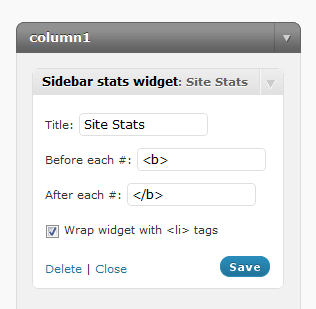
Widget options screen shot
The widget includes a control panel to change the title and format the HTML that is inserted before and after each numerical stat.
Installation Instructions
- Download sidebar-stats-widget.zip
- Decompress the file contents
- Upload the sidebar-stats-widget folder to a WordPress plugins directory (/wp-content/plugins)
- Activate the plugin from the Administration Dashboard
- Open the Widgets page under the Appearance section
- Drag the Sidebar Stats Widget to the active sidebar
- Configure the widget options to suit your needs and click Save
WordPress.org plugin page
This plugin is in the official WordPress Plugin Directory here.